الأربعاء، 22 أبريل 2020

TOP 10 HACKING MOVIES YOU SHOULD WATCH

Technology and hacking gave a new horizon to the science fiction movies. As hacking is getting common and every online thing is at risk whether it's 10% or 90%, not a system is 100% secure over the internet. Every day new security holes are getting discovered. So, now most of the sci-fi movies have the tech and hack stuff to grow awareness in everybody's mind about the online privacy and risk to their information. Here I am sharing top 10 hacking movies that worth a watch.

TOP 10 HACKING MOVIES

Here I have listed top 10 hacking movies that you should watch.

1. HACKERS (1995)

In Hackers, Angelina Jolie and Jonny Lee Miller portray two youthful and hip hackers. Miller portrays a hacker who got caught as a very young child at an age of 11 years after crashing thousands of computers and has been sentenced to zero computer access until his 18th birthday.

2. LIVE FREE OR DIE HARD (2007)

Live Free or Die Hard (also known as Die Hard 4 and released as Die Hard 4.0 outside North America) is a 2007 American action film, and the fourth in the Die Hard film series depicts a scenario where a hacker played by Timothy Olyphant (of Justified fame) takes down nearly the entire U.S. infrastructure in an attempt to transfer trillions of dollars from the Federal Reserve to his account. This movie gives a complete idea of how actually these blackhat hackers operate.

3. EAGLE EYE (2008)

In this movie, two people get a call from an unknown number by a woman. They get a task on the phone that if they don't follow the phone call they would die. This movie displays supercomputer hack on all networks and military networks. This is just an amazing movie on how artificial intelligence computer hacks our real life for bad motives.

4. ALGORITHM (2014)

The film 'Algorithm' tracks the travails of Will, who is the freelance computer hacker who hacks into a top-secret government contractor agency and downloads all their recently developed programs." You can see the full movie below

5. WARGAMES (1983)

The film features David Lightman (Broderick), a young high school student hacker who accidentally hacks into a military supercomputer and starts the countdown to World War III.

6. THE MATRIX (1999)

This is one of the greatest science fiction movies. In this movie, reality, as perceived by most humans, is actually a simulated reality called "the Matrix", created by machines to subdue the human population, while their bodies' heat and electrical activity are used as an energy source.
A character named "Neo", who is a computer Hacker, learns this truth and is drawn into a rebellion against the machines, which involves other people who have been freed from the "dream world". The Matrix franchise is a trilogy movie series.

7. TAKEDOWN (2000)

This movie is based on famous computer U.S. hacker Kevin David Mitnick. Based upon the book and written by his nemesis, Tsutomu Shimomura, the story tends to glorify Shimomura. Mitnick operated in the 1980s and '90s and eventually went to prison for a couple of years. Now, he is a highly paid IT security consultant, speaker, and writer.

8. BLACKHAT (2015)

Blackhat is newly released movie by Chris Hemsworth. In this movie, hackers hack the Chinese nuclear power plant to start a nuclear reaction. Simultaneously, they also hack the stock exchange and steal millions of dollars from the bank. This movie shows how a black hat hackers threaten governments.

9. THE ITALIAN JOB (2003)

Although the MINI Coopers are really the stars of The Italian Job (a remake of the 1969 film of the same name), Seth Green plays Lyle, a hacker among a group of elite thieves, who is able to manipulate traffic signals, among other devices, that make this grand theft possible.

10. UNTRACEABLE (2008)

This film involves a serial killer who rigs contraptions that kill his victims based on the number of hits received by a website KillWithMe.com that features a live streaming video of the victim. Millions of people log on, hastening the victims' deaths.

There may be more exciting hacking movies but I found these top 10 hacking movies that you should watch for once.
You can also find out the top 5 most dangerous hackers in the real world living.

More articles


  1. Programa De Hacking
  2. Clases De Hacker
  3. Hacker Definicion
  4. Hacking 2019
  5. What Is Growth Hacking
  6. Que Es Hacking Etico
  7. Hacking Pages

الثلاثاء، 21 أبريل 2020

Administración Remota De Servidores Desde Android

Sería muy util poder administrar todos nuestros servidores desde la palma de la mano.

Sin embargo una shell linux, no es viable en el teclado de un teléfono incluso de un tablet, sobretodo porque hay que escribir muchos símbolos, por ejemplo el guión, y estos teclados están pensados más bien para texto.

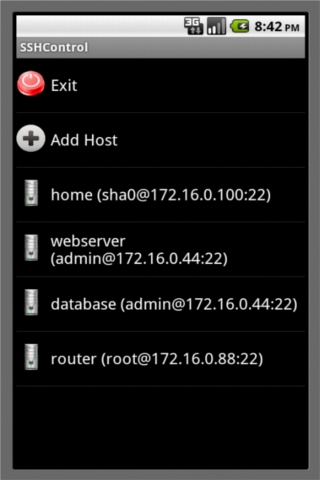
Pues bien, de esta necesidad surgió la aplicación SSHControl:


SSHControl

Esta problematica la he solucionado a base de utilizar nevegadores y estructurar los outputs para no acumular excesiva información en la pantalla.

- Navegador de ficheros
- Navegador de procesos
- Navegador de conexiones
- Navegador de logs
- Navegador de drivers de kernel

Esto permite administrar múltiples servidores con un solo dedo :)

Controlar la seguridad de sus servidores ahora es bastante sencillo y ágil, por ejemplo con solo hacer un "tap" encima de un usuario, podemos ver sos procesos asociados, con hacer otro tap en un proceso podemos kilearlo, ver mas info etc ..
Con hacer un tap encima de una apliacción, vemos sus conexiónes, con un tap en una conexión podemos agregar una regla de filtrado en el firewall, etc ..


En la siguiente versión habilitaré la opción de "Custom Commnands", la cual es muy util,
cada administrador o usuario linux, tiene una serie de comandos que repite con mucha frecuencia,
bien pues esta opción permite pre-programar estos comandos habituales, de manera que puedes lanzarlos con un simple tap.

En el roadmap tengo pensadas nuevas funcionalidades muy útiles :)

Aqui os dejo algunas capturas de pantalla:


Related articles


Learning Web Pentesting With DVWA Part 3: Blind SQL Injection

In this article we are going to do the SQL Injection (Blind) challenge of DVWA.
OWASP describes Blind SQL Injection as:
"Blind SQL (Structured Query Language) injection is a type of attack that asks the database true or false questions and determines the answer based on the applications response. This attack is often used when the web application is configured to show generic error messages, but has not mitigated the code that is vulnerable to SQL injection.
When an attacker exploits SQL injection, sometimes the web application displays error messages from the database complaining that the SQL Query's syntax is incorrect. Blind SQL injection is nearly identical to normal , the only difference being the way the data is retrieved from the database. When the database does not output data to the web page, an attacker is forced to steal data by asking the database a series of true or false questions. This makes exploiting the SQL Injection vulnerability more difficult, but not impossible."
To follow along click on the SQL Injection (Blind) navigation link. You will be presented with a page like this:
Lets first try to enter a valid User ID to see what the response looks like. Enter 1 in the User ID field and click submit. The result should look like this:
Lets call this response as valid response for the ease of reference in the rest of the article. Now lets try to enter an invalid ID to see what the response for that would be. Enter something like 1337 the response would be like this:

We will call this invalid response. Since we know both the valid and invalid response, lets try to attack the app now. We will again start with a single quote (') and see the response. The response we got back is the one which we saw when we entered the wrong User ID. This indicates that our query is either invalid or incomplete. Lets try to add an or statement to our query like this:
' or 1=1-- -
This returns a valid response. Which means our query is complete and executes without errors. Lets try to figure out the size of the query output columns like we did with the sql injection before in Learning Web Pentesting With DVWA Part 2: SQL Injection.
Enter the following in the User ID field:
' or 1=1 order by 1-- -
Again we get a valid response lets increase the number to 2.
' or 1=1 order by 2-- -
We get a valid response again lets go for 3.
' or 1=1 order by 3-- -
We get an invalid response so that confirms the size of query columns (number of columns queried by the server SQL statement) is 2.
Lets try to get some data using the blind sql injection, starting by trying to figure out the version of dbms used by the server like this:
1' and substring(version(), 1,1) = 1-- -
Since we don't see any output we have to extract data character by character. Here we are trying to guess the first character of the string returned by version() function which in my case is 1. You'll notice the output returns a valid response when we enter the query above in the input field.
Lets examine the query a bit to further understand what we are trying to accomplish. We know 1 is the valid user id and it returns a valid response, we append it to the query. Following 1, we use a single quote to end the check string. After the single quote we start to build our own query with the and conditional statement which states that the answer is true if and only if both conditions are true. Since the user id 1 exists we know the first condition of the statement is true. In the second condition, we extract first character from the version() function using the substring() function and compare it with the value of 1 and then comment out the rest of server query. Since first condition is true, if the second condition is true as well we will get a valid response back otherwise we will get an invalid response. Since my the version of mariadb installed by the docker container starts with a 1 we will get a valid response. Lets see if we will get an invalid response if we compare the first character of the string returned by the version() function to 2 like this:
1' and substring(version(),1,1) = 2-- -
And we get the invalid response. To determine the second character of the string returned by the version() function, we will write our query like this:
1' and substring(version(),2,2) = 1-- -
We get invalid response. Changing 1 to 2 then 3 and so on we get invalid response back, then we try 0 and we get a valid response back indicating the second character in the string returned by the version() function is 0. Thus we have got so for 10 as the first two characters of the database version. We can try to get the third and fourth characters of the string but as you can guess it will be time consuming. So its time to automate the boring stuff. We can automate this process in two ways. One is to use our awesome programming skills to write a program that will automate this whole thing. Another way is not to reinvent the wheel and try sqlmap. I am going to show you how to use sqlmap but you can try the first method as well, as an exercise.
Lets use sqlmap to get data from the database. Enter 1 in the User ID field and click submit.
Then copy the URL from the URL bar which should look something like this
http://localhost:9000/vulnerabilities/sqli_blind/?id=1&Submit=Submit
Now open a terminal and type this command:
sqlmap --version
this will print the version of your sqlmap installation otherwise it will give an error indicating the package is not installed on your computer. If its not installed then go ahead and install it.
Now type the following command to get the names of the databases:
sqlmap -u "http://localhost:9000/vulnerabilities/sqli_blind/?id=1&Submit=Submit" --cookie="security=low; PHPSESSID=aks68qncbmtnd59q3ue7bmam30" -p id
Here replace the PHPSESSID with your session id which you can get by right clicking on the page and then clicking inspect in your browser (Firefox here). Then click on storage tab and expand cookie to get your PHPSESSID. Also your port for dvwa web app can be different so replace the URL with yours.
The command above uses -u to specify the url to be attacked, --cookie flag specifies the user authentication cookies, and -p is used to specify the parameter of the URL that we are going to attack.
We will now dump the tables of dvwa database using sqlmap like this:
sqlmap -u "http://localhost:9000/vulnerabilities/sqli_blind/?id=1&Submit=Submit" --cookie="security=low; PHPSESSID=aks68qncbmtnd59q3ue7bmam30" -p id -D dvwa --tables
After getting the list of tables its time to dump the columns of users table like this:
sqlmap -u "http://localhost:9000/vulnerabilities/sqli_blind/?id=1&Submit=Submit" --cookie="security=low; PHPSESSID=aks68qncbmtnd59q3ue7bmam30" -p id -D dvwa -T users --columns
And at last we will dump the passwords column of the users table like this:
sqlmap -u "http://localhost:9000/vulnerabilities/sqli_blind/?id=1&Submit=Submit" --cookie="security=low; PHPSESSID=aks68qncbmtnd59q3ue7bmam30" -p id -D dvwa -T users -C password --dump
Now you can see the password hashes.
As you can see automating this blind sqli using sqlmap made it simple. It would have taken us a lot of time to do this stuff manually. That's why in pentests both manual and automated testing is necessary. But its not a good idea to rely on just one of the two rather we should leverage power of both testing types to both understand and exploit the vulnerability.
By the way we could have used something like this to dump all databases and tables using this sqlmap command:
sqlmap -u "http://localhost:9000/vulnerabilities/sqli_blind/?id=1&Submit=Submit" --cookie="security=low; PHPSESSID=aks68qncbmtnd59q3ue7bmam30" -p id --dump-all
But obviously it is time and resource consuming so we only extracted what was interested to us rather than dumping all the stuff.
Also we could have used sqlmap in the simple sql injection that we did in the previous article. As an exercise redo the SQL Injection challenge using sqlmap.

References:

1. Blind SQL Injection: https://owasp.org/www-community/attacks/Blind_SQL_Injection
2. sqlmap: http://sqlmap.org/
3. MySQL SUBSTRING() Function: https://www.w3schools.com/sql/func_mysql_substring.asp
Related word

الاثنين، 20 أبريل 2020

Chapter 1To 5 HTML

Contents

 
About
 
................................................................................................................................................................................... 1
 
Chapter 1: Getting started with HTML
 
................................................................................................................ 2
 
Section 1.1: Hello World 2
 
Chapter 2: Doctypes
 
.................................................................................................................................................... 4
 
Section 2.1: Adding the Doctype 4
Section 2.2: HTML 5 Doctype 4
 
Chapter 3: Headings
 
.................................................................................................................................................... 5
 
Section 3.1: Using Headings 5
 
Chapter 4: Paragraphs
 
.............................................................................................................................................. 6
 
Section 4.1: HTML Paragraphs
Chapter 5: Text Formatting
 
.....................................................................................................................................  6
.....................................................................................................................................  7
 
Section 5.1: Highlighting 7
Section 5.2: Bold, Italic, and Underline 7
Section 5.3: Abbreviation 8
Section 5.4: Inserted, Deleted, or Stricken 8
Section 5.5: Superscript and Subscript 8
 
Chapter 1: Getting started with HTML

Version Specification Release Date
1.0 N/A 1994-01-01
2.0 RFC 1866
1995-11-24
3.2 W3C: HTML 3.2 Specification
1997-01-14
4.0 W3C: HTML 4.0 Specification
1998-04-24
4.01 W3C: HTML 4.01 Specification
1999-12-24
5 WHATWG: HTML Living Standard
2014-10-28
5.1 W3C: HTML 5.1 Specification
2016-11-01
Section 1.1: Hello World
Introduction

HTML (Hypertext Markup Language) uses a markup system composed of elements which represent specific content. Markup means that with HTML you declare what is presented to a viewer, not how it is presented. Visual representations are defined by Cascading Style Sheets (CSS) and realized by browsers. Still existing elements that allow for such, like e.g. font, "are entirely obsolete, and must not be used by authors"[1].
HTML is sometimes called a programming language but it has no logic, so is a markup language. HTML tags provide semantic meaning and machine-readability to the content in the page.
An element usually consists of an opening tag (<element_name>), a closing tag (</element_name>), which contain the element's name surrounded by angle brackets, and the content in between:
<element_name>...content...</element_name>

There are some HTML elements that don't have a closing tag or any contents. These are called void elements. Void elements include <img>, <meta>, <link> and <input>.
Element names can be thought of as descriptive keywords for the content they contain, such as video, audio, table, footer.
A HTML page may consist of potentially hundreds of elements which are then read by a web browser, interpreted and rendered into human readable or audible content on the screen.
For this document it is important to note the difference between elements and tags:

Elements: video, audio, table, footer

Tags: <video>, <audio>, <table>, <footer>, </html>, </body>


Element insight

Let's break down a tag...

The <p> tag represents a common paragraph.

Elements commonly have an opening tag and a closing tag. The opening tag contains the element's name in angle brackets (<p>). The closing tag is identical to the opening tag with the addition of a forward slash (/) between the opening bracket and the element's name (</p>).
Content can then go between these two tags: <p>This is a simple paragraph.</p>.
 
Creating a simple page

The following HTML example creates a simple "Hello World" web page.

HTML files can be created using any text editor. The files must be saved with a .html or .htm[2] extension in order to be recognized as HTML files.

Once created, this file can be opened in any web browser.


Simple page break down

These are the tags used in the example:

Tag Meaning
<!DOCTYPE> Defines the HTML version used in the document. In this case it is HTML5.
See the doctypes topic for more information.
Opens the page. No markup should come after the closing tag (</html>). The lang attribute declares
 
<html>


<head>


<meta>
 
the primary language of the page using the ISO language codes (en for English). See the Content Language topic for more information.
Opens the head section, which does not appear in the main browser window but mainly contains information about the HTML document, called metadata. It can also contain imports from external stylesheets and scripts. The closing tag is </head>.
Gives the browser some metadata about the document. The charset attribute declares the character encoding. Modern HTML documents should always use UTF-8, even though it is not a requirement. In HTML, the <meta> tag does not require a closing tag.
See the Meta topic for more information.
 
<title> The title of the page. Text written between this opening and the closing tag (</title>) will be displayed on the tab of the page or in the title bar of the browser.
<body> Opens the part of the document displayed to users, i.e. all the visible or audible content of a page. No content should be added after the closing tag </body>.
<h1> A level 1 heading for the page.
See headings for more information.
<p> Represents a common paragraph of text.

1. ↑ HTML5, 11.2 Non-conforming features
2. ↑ .htm is inherited from the legacy DOS three character file extension limit.
 
Chapter 2: Doctypes

Doctypes - short for 'document type' - help browsers to understand the version of HTML the document is written in for better interpretability. Doctype declarations are not HTML tags and belong at the very top of a document. This topic explains the structure and declaration of various doctypes in HTML.
Section 2.1: Adding the Doctype
The <!DOCTYPE> declaration should always be included at the top of the HTML document, before the <html> tag.

Version ≥ 5

See HTML 5 Doctype for details on the HTML 5 Doctype.


Section 2.2: HTML 5 Doctype
HTML5 is not based on SGML (Standard Generalized Markup Language), and therefore does not require a reference to a DTD (Document Type Definition).
HTML 5 Doctype declaration:

Case Insensitivity

Per the W3.org HTML 5 DOCTYPE Spec:

A DOCTYPE must consist of the following components, in this order:

1. A string that is an ASCII case-insensitive match for the string "<!DOCTYPE".

therefore the following DOCTYPEs are also valid:


This SO article discusses the topic extensively: Uppercase or lowercase doctype?
 
Chapter 3: Headings

HTML provides not only plain paragraph tags, but six separate header tags to indicate headings of various sizes and thicknesses. Enumerated as heading 1 through heading 6, heading 1 has the largest and thickest text while heading 6 is the smallest and thinnest, down to the paragraph level. This topic details proper usage of these tags.
Section 3.1: Using Headings
Headings can be used to describe the topic they precede and they are defined with the <h1> to <h6> tags. Headings support all the global attributes.

<h1> defines the most important heading.
<h6> defines the least important heading.

Defining a heading:

Correct structure matters

Search engines and other user agents usually index page content based on heading elements, for example to create a table of contents, so using the correct structure for headings is important.
In general, an article should have one h1 element for the main title followed by h2 subtitles – going down a layer if necessary. If there are h1 elements on a higher level they shoudn't be used to describe any lower level content.

Example document (extra intendation to illustrate hierarchy):

 
Chapter 4: Paragraphs

Column Column
<p> Defines a paragraph
<br> Inserts a single line break
<pre> Defines pre-formatted text

Paragraphs are the most basic HTML element. This topic explains and demonstrates the usage of the paragraph element in HTML.

Section 4.1: HTML Paragraphs

The HTML <p> element defines a paragraph:


Display-

You cannot be sure how HTML will be displayed.

Large or small screens, and resized windows will create different results.

With HTML, you cannot change the output by adding extra spaces or extra lines in your HTML code. The browser will remove any extra spaces and extra lines when the page is displayed:
 
Chapter 5: Text Formatting

While most HTML tags are used to create elements, HTML also provides in-text formatting tags to apply specific text-related styles to portions of text. This topic includes examples of HTML text formatting such as highlighting, bolding, underlining, subscript, and stricken text

Section 5.1: Highlighting

The <mark> element is new in HTML5 and is used to mark or highlight text in a document "due to its relevance in another context".1

The most common example would be in the results of a search were the user has entered a search query and results are shown highlighting the desired query.


Output:


A common standard formatting is black text on a yellow background, but this can be changed with CSS.

Section 5.2: Bold, Italic, and Underline
Bold Text

To bold text, use the <strong> or <b> tags:


or


What's the difference? Semantics. <strong> is used to indicate that the text is fundamentally or semantically important to the surrounding text, while <b> indicates no such importance and simply represents text that should be bolded.

If you were to use <b> a text-to-speech program would not say the word(s) any differently than any of the other words around it - you are simply drawing attention to them without adding any additional importance. By using
<strong>, though, the same program would want to speak those word(s) with a different tone of voice to convey that the text is important in some way.

Italic Text

To italicize text, use the <em> or <i> tags:

 
or


What's the difference? Semantics. <em> is used to indicate that the text should have extra emphasis that should be stressed, while <i> simply represents text which should be set off from the normal text around it.

For example, if you wanted to stress the action inside a sentence, one might do so by emphasizing it in italics via
<em>: "Would you just submit the edit already?"

But if you were identifying a book or newspaper that you would normally italicize stylistically, you would simply use
<i>: "I was forced to read Romeo and Juliet in high school.

Underlined Text

While the <u> element itself was deprecated in HTMl 4, it was reintroduced with alternate semantic meaning in HTML 5 - to represent an unarticulated, non-textual annotation. You might use such a rendering to indicate misspelled text on the page, or for a Chinese proper name mark.


Section 5.3: Abbreviation

To mark some expression as an abbreviation, use <abbr> tag:


If present, the title attribute is used to present the full description of such abbreviation.

Section 5.4: Inserted, Deleted, or Stricken

To mark text as inserted, use the <ins> tag:


To mark text as deleted, use the <del> tag:


To strike through text, use the <s> tag:


Section 5.5: Superscript and Subscript

To offset text either upward or downward you can use the tags <sup> and <sub>. To create superscript:
 

To create subscript:
 
@EVERYTHINGNT

Related news


Cómo Instalar Ubuntu 19.10 Junto A Windows O Como Sistema Operativo Único

Aunque Windows haya tomado la delantera en los ordenadores, y así mismo haya incursionado en los dispositivos móviles, aún existen usuarios que no les agrada el sistema operativo por excelencia, tal vez sea por la cantidad de licencias que hay que adquirir para no incurrir en fraude o en gastos por compra de software compatibles al tratarse de un sistema sin código libre. Pues bien así como se presentó alguna vez Remix Os, un software que permitía combinar iOS y Windows, hoy te presentamos una alternativa para combinar Ubuntu con Windows.
De la misma manera como Windows ha evolucionado desde Windows XP hasta Windows 10, también Ubuntu ha logrado presentar nuevas actualizaciones y esta es una de las versiones más recientes, se trata de la actualización 19.10, una versión de código libre y adaptable en cualquier ordenador, recuerda hacer las particiones pertinentes antes de realizar cualquier instalación. 
www.dominatupc.com.co
Aunque se le conoce con el serial 19.10, esta versión de Ubuntu tiene un nombre propio, Zesty Zapus, con lanzamiento único. Una versión que le dice adiós a las particiones de intercambio, entregando al usuario un archivo modificable en lugar de particiones o unidades de disco fragmentado.  Otras ventajas radican en la posibilidad de mejorar el rendimiento del ordenador por su poco consumo de memoria RAM, una de las razones por la cual muchos usuarios lo prefieren. Todo el proceso se verá reflejado en tu ordenador, si sigues los pasos establecidos en el siguiente vídeo.
Presentamos este post como una alternativa para los usuarios que desean probar algunas bondades que puede ofrecer un sistema operativo diferente al ya mencionado Windows. Agradecemos al YouTuber BuclesUbuntu, por tomarse su trabajo muy en serio, presentándole a muchos usuarios los tutoriales con información explicita, pueden visitar su canal siguiendo este enlace: BuclesUbuntu

Para descargar da clic aquí 

Agradecemos a todos nuestros usuarios por permitirnos llevarles este tipo de contenidos, si usted desea hacer algún aporte o sugerencia, puedes escribirnos en la barra de comentarios, estaremos atentos a su participación. También te recomendamos leer: (Cómo instalar Windows en unidades externas)


Related articles

$$$ Bug Bounty $$$

What is Bug Bounty ?


A bug bounty program, also called a vulnerability rewards program (VRP), is a crowdsourcing initiative that rewards individuals for discovering and reporting software bugs. Bug bounty programs are often initiated to supplement internal code audits and penetration tests as part of an organization's vulnerability management strategy.


Many software vendors and websites run bug bounty programs, paying out cash rewards to software security researchers and white hat hackers who report software vulnerabilities that have the potential to be exploited. Bug reports must document enough information for for the organization offering the bounty to be able to reproduce the vulnerability. Typically, payment amounts are commensurate with the size of the organization, the difficulty in hacking the system and how much impact on users a bug might have.


Mozilla paid out a $3,000 flat rate bounty for bugs that fit its criteria, while Facebook has given out as much as $20,000 for a single bug report. Google paid Chrome operating system bug reporters a combined $700,000 in 2012 and Microsoft paid UK researcher James Forshaw $100,000 for an attack vulnerability in Windows 8.1.  In 2016, Apple announced rewards that max out at $200,000 for a flaw in the iOS secure boot firmware components and up to $50,000 for execution of arbitrary code with kernel privileges or unauthorized iCloud access.


While the use of ethical hackers to find bugs can be very effective, such programs can also be controversial. To limit potential risk, some organizations are offering closed bug bounty programs that require an invitation. Apple, for example, has limited bug bounty participation to few dozen researchers.

Related word


KPOT Info Stealer Samples


KPOT Stealer is a "stealer" malware that focuses on stealing account information and other data from various software applications and services

References

1.  2020-04-19 Didier Stevens posted analysis of KPOT infostealer on the Infosec Handlers Diary blog "KPOT Analysis: Obtaining the Decrypted KPOT EXE"
These are samples to follow his analysis routine.

2. 2019-05-09 Proofpoint. New KPOT v2.0 stealer brings zero persistence and in-memory features to silently steal credentials


Download

             Other malware


Download. Email me if you need the password (see in my profile)


Hashes

1. From Didier Stevens' post

MD5  56ad7b243511ee7398d43df7643dc904
SHA-1  ae5ab7798ca267b1265a0496c562f219821d17cf
SHA-256  3fd4aa339bdfee23684ff495d884aa842165e61af85fd09411abfd64b9780146

2. From Proofpoint

MD5 7d7667ddce8fd69a0fd50bb08c287d10
SHA-1 087fc3e9a082983ee6a2b25f0ccb09eb723e0f39

SHA-256 67f8302a2fd28d15f62d6d20d748bfe350334e5353cbdef112bd1f8231b5599d

MD5 45ddc687f88b45fc3fec79f9dc8b38e2
SHA-1 de37b748e0e32d96c31f469f9ba4ea4f11e3e78b
SHA-256 36dcd40aee6a42b8733ec3390501502824f570a23640c2c78a788805164f77cecontagio.deependresearch.org/crime/kpotstealer(proofpoint)_win_samp.zip

Related links


  1. Hacking Tools 2019
  2. Hacking App
  3. Pentest Tools Website Vulnerability
  4. Hack Website Online Tool
  5. Hack Tools Mac
  6. Hacking Apps
  7. Hacks And Tools
  8. Growth Hacker Tools
  9. Pentest Tools Website
  10. Hack Tool Apk
  11. Pentest Tools Kali Linux
  12. Hacker Tools 2020
  13. Hack And Tools
  14. Hacking Apps
  15. Hacking Tools 2019
  16. Bluetooth Hacking Tools Kali