الخميس، 4 يونيو 2020

15 Important Run Commands Every Windows User Should Know

There are several ways to efficiently access the files, folders, and programs in Windows operating system. We can create shortcuts, pin programs to the taskbar, Start menu shortcuts etc. but we can't do it for all programs in many cases. However, the Windows Run Command box is one of the most efficient ways of accessing system programs, folders, and settings.

In this article, I am going to share 15 most important Run commands for Windows users. These commands can make it easier to manage a lot of tasks.
How to open Windows Run command box?
You need to press Win+R (Hold Windows button then Press R)

Important Run Commands Every Windows User Should Know

1. %temp%
This is the fastest way to clear the temporary files from your computer. It can save a lot of space which was being wasted by temporary files.
2. cmd 
This command will open the windows DOS command prompt. Windows command prompt is very useful for performing many tasks which are not possible using graphical user interface.
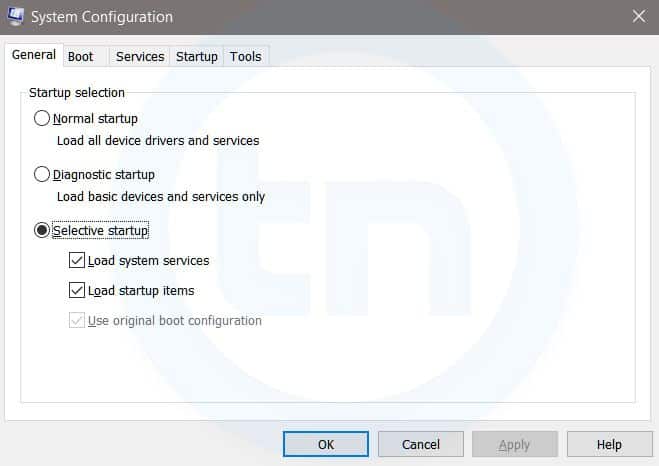
3. MSConfig
Windows Run Command - MSconfig-compressed
Windows System Configuration
This command will open Windows System Configuration where you can edit different things like the boot options, startup options, services, etc.
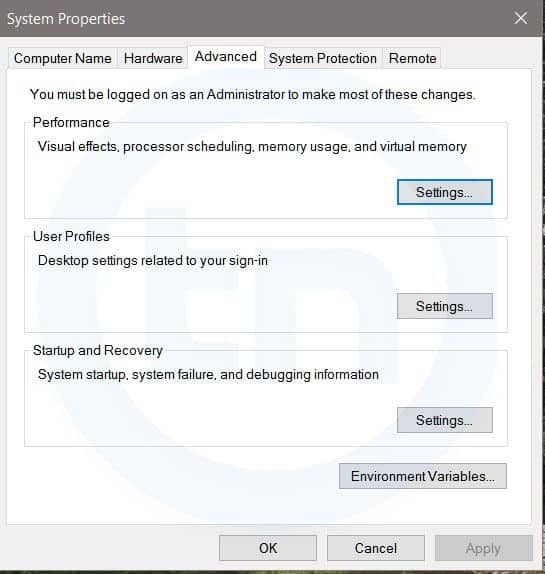
4. sysdm.cpl
Windows Run Command - sysdm cpl-compressed
System Properties window
This command will open the System Properties window, Where you can change the system protection and performance related many settings
5. Powershell
Powershell is very similar the command prompt. Just type this command in the Run dialog box, and you will have your PowerShell opened without administrator privileges.
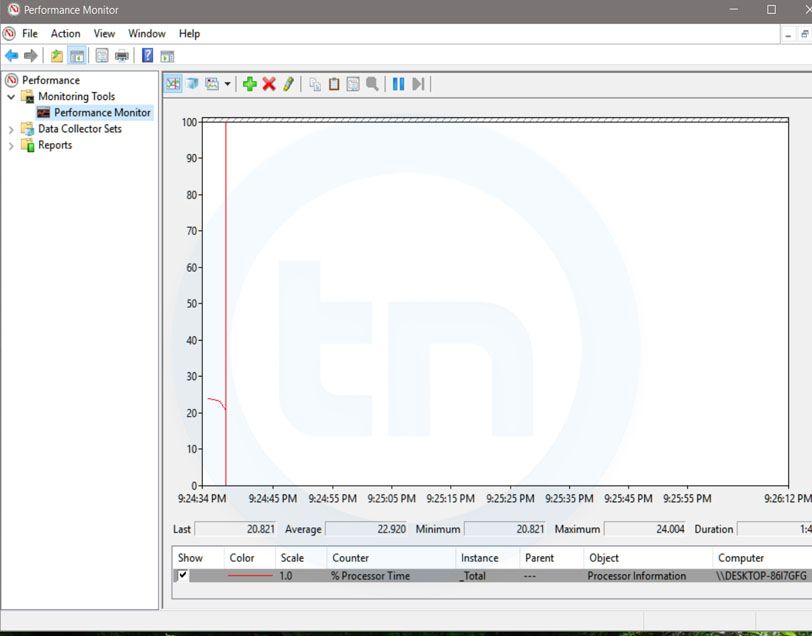
6. perfmon.msc
Windows Run Command - perfmon msc-compressed
Windows System Performance monitor
This command can be used to monitor the performance of your computer. There are plenty of options for monitoring the system performance
7. regedit
Regedit Run command is used to open the Windows Registry. It is a hierarchical database that hosts all the configurations and settings of Windows operating system, it's users and the installed software.
8. \ (Backslash)
This is one of the lesser known Run commands. Just enter the backslash into the Run dialog box and it will open up the C drive. It is one of the quickest ways to access the C drive.
9. . (Dot)
This is yet another lesser known Run command. When executed, it opens the current user's home folder which hosts all the other local folders like the Downloads, Documents, Desktop, Pictures, etc.
10. .. (Double Dots)
When you execute these two dots in the Run dialog box, it will open up the Users folder which is located directly on the C drive
11. Control
This command will open the control panel. Control panel is used for managing all the system settings and programs
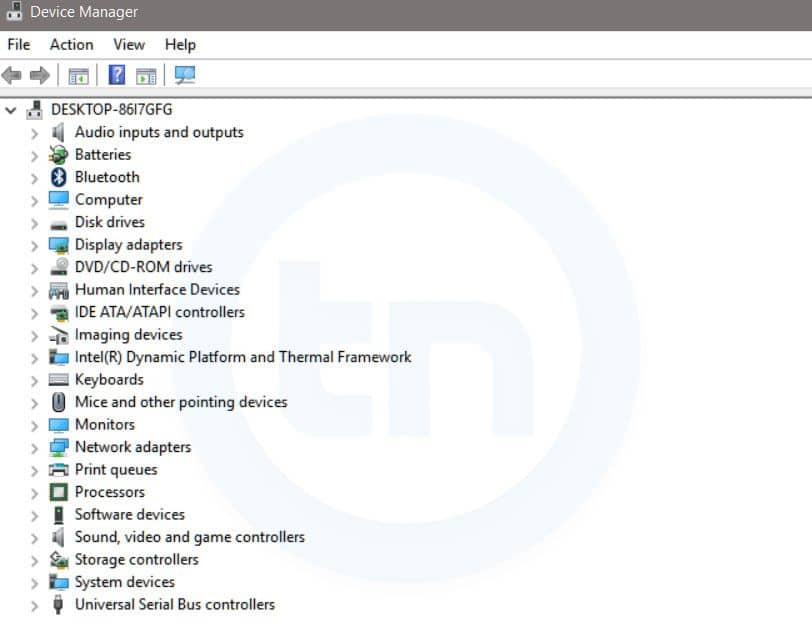
12. hdwwiz.cpl
Windows Run Command - hdwwiz-
Windows Device Manager
This command is used to open the Device Manager in Windows. You can manage all the device connected internally or externally to your PC.
13. Notepad
The quickest way to open notepad in Windows. Just type this command in Run Box and hit enter.
14. osk
This command will open On-Screen Keyboard on your display monitor. You can easily touch and type or use your mouse for typing.
15. taskmgr 
This command will open task manager where you can manage all the processes and programs running on Windows Operating system.
More articles
  1. Pentest Dns
  2. Hacker Website
  3. Hacking Images
  4. Pentest Framework
  5. Pentest Plus
  6. Hacker Keyboard
  7. Pentest Framework
  8. Hacker Keyboard
  9. Pentest Vs Ceh
  10. Pentest Stages
  11. Hacking Typer
  12. Pentest Wifi
  13. Pentest Reporting Tool
  14. Pentest Environment
  15. Hacking With Raspberry Pi
  16. Pentesting And Ethical Hacking
  17. Hacker Kevin Mitnick
  18. Hacking Vpn
  19. Pentest Network
  20. Pentest Kit

Linux/AirDropBot Samples


Reference


Download

       
      Other malware


Hashes

MD5
SHA256
SHA1
85a8aad8d938c44c3f3f51089a60ec16
1a75642976449d37acd14b19f67ed7d69499c41aa6304e78c7b2d977e0910e37
2f0079bb42d5088f1fec341cb68f15cdd447ac43
2c0afe7b13cdd642336ccc7b3e952d8d
64c0e594d4926a293a1f1771187db8cfb44a0dda80d8b25b4f0c975e1e77745c
fef65085a92654cbcf1e3e0d851c6cda8dd3b03d
94b8337a2d217286775bcc36d9c862d2
71c02b99046c3be12e31577aa6623ce47dfb7f369e67af564d2bd499080c03b6
d5deeb1b61026479acb421583b7b82d09d63e921
417151777eaaccfc62f778d33fd183ff
bf6941e644a430fef43afc749479859665a57b711d5483c2c7072049c7db17b7
f76b9447db23229edae17a3160e04df41bc35a9d
d31f047c125deb4c2f879d88b083b9d5
2785845c97a69e15c9c1535216732a9d24bcf8f7244ce7872a2b0d2d4bcb92c3
4693505ef4c029112c4b85a16762cf90f0d69c15
ff1eb225f31e5c29dde47c147f40627e
f7ab3d315961d84da43f30a186136a56f5aa1e9afe6b56a0d357accd5f0ab81a
d5f2a976b703b5e687ffc58c408e0bc880838ae7
f3aed39202b51afdd1354adc8362d6bf
fa2bc8d988c8dfbdc965f1373bd80e9f5862868397c1bcb5e84b1e9c1756e0e2
31f0bca917cfbffcc126219439d38fe80d5c8460
083a5f463cb84f7ae8868cb2eb6a22eb
d654850f7785a5adb34f0808e2952f66e3784c0a32427fab9e97c75f0a48d9f5
ed4359a2805ce69771253d2257598b5c63c36c8e
9ce4decd27c303a44ab2e187625934f3
a2a245f12ae44cca79f03a465e2dc3dfa222dfcfda1017824b16abf397f16255
710e85ae3d362d3c8f3759319c308ff9b4dcdc86
b6c6c1b2e89de81db8633144f4cb4b7d
2480be0d00193250bc9eb50b35403399ed44f53d5d919600ee5bab14ef769530
ee77141054ac8d2fad062bcd79832b5f481c7dfb
abd5008522f69cca92f8eefeb5f160e2
509299df2f6150f59ed777873d3b7c708587c68a4004b4654a8cf2a640dd50aa
15cf94828c07e080b9c455738f3219859d9ab732
a84bbf660ace4f0159f3d13e058235e9
565deb4b1a7397d2497c75c9635b81d2e3b6427f0c576e5cd3c4224660712b56
c56fea8c1c949394e539d5ab3e3df7dfd329844a
5fec65455bd8c842d672171d475460b6
121c7ebfb99d8ef39f72bf7c787be4c15e2e08b731f01172605a4d34d27f08eb
3b6ca4525c3aad0583400b911b015071a0ea6133
4d3cab2d0c51081e509ad25fbd7ff596
7f71577b63b449c1a9e9aa516fa9e4320fe5f79548a00025a430894a269ab57b
d521f25362791de4d8a82a2683f032c1dd816e74
252e2dfdf04290e7e9fc3c4d61bb3529
834fc5c0ccfde1f3d52d88355717f119221118ee2d26018b417c50d066e9e978
c8f3130e64a6f825b1e97060cf258e9086a2b650
5dcdace449052a596bce05328bd23a3b
22949a7a3424f3b3bdf7d92c5e7a7a0de4eb6bbe9c523d57469944f6a8b1d012
f2c072560559a3f112e2000c8e28ee975b2b9db3
9c66fbe776a97a8613bfa983c7dca149
18c08d3c39170652d4770b2f7785e402b58c1f6c51ba1338be4330498ef268f4
18a99ec770109357d1adbc1c2475b17d4dcca651
59af44a74873ac034bd24ca1c3275af5
1c345b5e7c7fdcc79daa5829e0f93f6ae2646f493ae0ec5e8d66ab84a12a2426
98f789e91809203fbf1b7255bd0579fc86a982ba
9642b8aff1fda24baa6abe0aa8c8b173
98165c65d83fd95379e2e7878ac690c492ac54143d7b12beec525a9d048bedae
bd447e0e77a9192b29da032db8e1216b7b97f9ed
e56cec6001f2f6efc0ad7c2fb840aceb
7a2bf405c5d75e4294c980a26d32e80e108908241751de4c556298826f0960f1
b1c271d11797baac2504916ac80fd9e6fac61973
54d93673f9539f1914008cfe8fd2bbdd
c396a1214956eb35c89b62abc68f7d9e1e5bd0e487f330ed692dd49afed37d5a
72a9b8d499cce2de352644a8ffeb63fd0edd414b
6d202084d4f25a0aa2225589dab536e7
c691fecb7f0d121b5a9b8b807c5767ad17ae3dd9981c47f114d253615d0ef171
a68149c19bfddcdfc537811a3a78cd48c7c74740
cfbf1bd882ae7b87d4b04122d2ab42cb
892986403d33acb57fca1f61fc87d088b721bdd4b8de3cd99942e1735188125b
a067a0cf99650345a32a65f5bc14ab0da97789b6

Related articles


  1. Pentest With Kali
  2. Pentest Dns
  3. Pentest Jobs
  4. Pentest Open Source
  5. Pentest
  6. Pentester Academy
  7. Hacking Health
  8. What Hacking Is
  9. Hacking Youtube
  10. Pentest Cyber Security
  11. Pentest Distro
  12. Pentest Open Source
  13. Pentest Partners

الأربعاء، 3 يونيو 2020

Sherlock Tool | Find Usernames Across Social Networks

More info


  1. Pentesting And Ethical Hacking
  2. Pentest Os
  3. Hacking Gif
  4. Pentestlab
  5. Hacking
  6. Pentest Blog
  7. Hacking Language
  8. Pentestlab
  9. Pentest Blog
  10. Pentest Services
  11. Pentest Tools Framework

Top 20 Best Free Hacking Apps For Android |2019|

 20 Best Free hacking apps For Android |2019|. 

Android is now one of the most popular operating systems. So, hackers have also started using Android devices for their tasks. Now Android devices are used for penetration testing and other hacking activities including IT security administrator, Wi-Fi hacking and network monitoring. There are several hacking apps or Android devices. So, we have curated a list of best hacking apps for Android.


Before you start using these apps, you must take a backup of your important data. I also recommend the use of these apps on a separate device. Using this on your primary phone is not recommended. It is because many of these apps require a rooted device and app can also harm your phone.


Note: Hacking apps can be used for educational and malicious purpose. But we never encourage malicious operations. We are listing the apps here just for educational purpose. You should only use these apps to learn. We do not support any unethical use of these apps.

1.  AndroRAT

AndroRAT stands for Android RAT. RAT is the short form of Remote Administrative Tool and it allows an attacker to remotely control and fetch information from a device. AndroRAT does the same thing. It has a server developed in Java/Swing but the Android application has been developed in Java Android.

AndroRAT allows you to connect information like call logs, contacts, messages, location and more. You can remotely monitor sent and received messages send texts, use the camera, open a URL in the browser, make phone calls and remotely monitor the device.

The connection to the server can be triggered by an SMS or a call. From the server GUI, you can check all the connected clients and access information.

As the app allows silent remote access, it is not available on Play Store.

                Download APK

2. zANTI

zANTI is a known penetration testing suite of applications you can install locally on Android smartphone. This tool brings scanning tools Diagnostic features and Reporting tools. You can use this malicious software to attack a network and check for any loopholes in your network. This tool is used to test redirect and SSL stripping attacks. You can edit request and response messages from web servers, the host takes websites from your Android phone and more.


                  Download 

3. FaceNiff

FaceNiff is another good Android hacking that allows you to intercept the traffic of your WiFi network. You can use this tool to snoop what people are doing on the network you are. You can snoop on services like Facebook, Twitter, Amazon, YouTube and more. This is one of the notable too for steal cookies from the WiFi network and gives the attacker unauthorized access to other people's account.

This app requires a rooted device. So, you can only use the app if you have a rooted phone.

Download APK

4. Droidsheep

Droidsheep is also a similar app that helps security analysts understand what is happening in your Wi-Fi network. Like Face Sniff, this app can also hijack the web session profiles over a network and supports most of the services and websites.

The primary difference between Droidsheep and FaceSniff is that Droidsheep works with almost all the websites while FaceSniff has limited support.

                     Download APK

5. Hackode

Hackode is another good hacking apps for Android. It is not a single app but a collection of tools for ethical hackers and penetration testers. The app comes with three modules including Reconnaissance, Scanning and Security Feed. You can use this app for SQL Injection, Google hacking, MySQL Server, Whois, Scanning, DNS Dif, DNS lookup, IP, MX Records, Security RSS Feed, Exploits etc.

The app is still in beta, but available in Play Store.

                  Download Here

6. cSploit

cSploit is also a good security tool for Android. It comes with several options like cracking Wi-Fi password, installing backdoors, finding vulnerabilities and their exploits. If you are looking for a good hacking app or hacker app for Android, you should try this one for sure.

                  Download APK

7. DroidBox

DroidBox is also a similar kind of app that allows you to do the dynamic analysis of Android applications. You can use this app to get information like hashes of APK package, network traffic, SMS & phone calls, Incoming/outgoing network data, Listing broadcast receivers and more.

                    Download

8. Nmap

If you are into security or hacking, I am sure you already know the name of this too. Like the desktop tool, Nmap for Android also allows you to scan

It works on both on non-rooted and rooted phones. If you are a beginner, you should try this app and learn from it.

                      Download

9. SSHDroid

SSHDroid is SSH tool developed for Android. It lets you connect to a remote computer and run terminal commands, transfer and edit files. The app also provided features like shared-key authentication, WiFi autostart whitelist, extended notification control etc,

This app is available on Play Store.

                    Download

10. Kali Linux NetHunter

Kali Linux NetHunter is an open source penetration testing platform for Android. It officially supports Nexus and OnePlus devices. It provides the ultimate penetration testing platform that allows you to perform a wide range of attacks.

                     Download

11. APKInspector

APKInspector allows you to perform reverse engineering on an APK. you can use this to get a deep insight or APK and get the source code of any Android app. You can do modifications in the APK and visualize the DEX code to erase the credits and license.

                 Download APK

12. Shark for Root

Shark for Root is an advanced hacking tool for security experts and hackers. It can work as a traffic snipper. You can use the tcpdump command on rooted devices. It works on Wi-Fi, 3G, and FroYo tethered mode.

                    Download

13. dSploit

dSploit is an Android network penetrating testing suit. You can download and install it on your device to perform network security testing. It supports all Android devices running on Android 2.3 Gingerbread or higher. You need to root this phone for using the app. After rooting the phone, you need to download BusyBox from Google Play Store

The app comes with several modules including Port Scanner, Inspector, RouterPWN, Trace, Login Cracker, Packet Forger, Vulnerability Finder, and MITM.

                      Download

14. WPScan

WPScan is a WordPress vulnerability scanner for Android. This app is used to scan WordPress based websites and find possible vulnerabilities. WPScan is a popular desktop tool but this WPScan for Android is not related to that. So, do not think of it as an official WPScan app.

                      Download

15. Network Mapper

Network Mapper is a network scanner tool for network admins. It used to scan the network, lists all devices connected and find Open ports of various servers like FTP servers, SSH servers, SMB servers etc on the network. The tool is available on Play Store.

                     Download

16. Andosid

Andosid is like LOIC for the desktop. This tool is used to perform DOS attacks from Android mobile phones. You can use this tool to set a target URL and perform a DOS attack in one click. The tool will start flooding target URL with fake requests.

                     Download

17. DroidSQLi

DroidSQLi app allows attackers to perform SQL Injection on a target URL. You just need to find a target URL and this tool will start the fully automated SQL Injection attack.

                     Download

18. AppUse

AppUse is a Virtual Machine developed by AppSec Labs. It is a freely available mobile application security testing platform that comes with lots of custom made tools by AppSec Labs. If you want to sue your Android phone as your penetration testing tool, this one is for you.

                   Download

19. Network Spoofer

Network Spoofer is also a good hacking app for android. It lets you change the website on other people's computer from your Android phone. Connect to a WiFI network and then choose a spoof to use with the app. this tool is to demonstrate how vulnerable a network is. Do not try this on any unauthorized networks.

                 Download

20. DroidSheep Guard

As the name suggests, DroidSheep Guard works against DroidSheep. It monitors Android devices' ARP-table and tries to detect ARP-Spoofing attack on your network. It does not require a rooted device.

               Download


@EVERYTHING NT


More info
  1. Pentest Environment
  2. Pentest As A Service
  3. Pentestmonkey Sql Injection
  4. Hacking Browser
  5. Hacker Box
  6. Pentest Standard
  7. Pentest Firewall
  8. Basic Pentest 1 Walkthrough
  9. Hacking Games
  10. Hacking Resources
  11. Pentest Windows
  12. Pentest Cyber Security

The OWASP Foundation Has Selected The Technical Writer For Google Season Of Docs

The OWASP Foundation has selected the technical writer for Google Season of Docs by Fabio Cerullo


The OWASP Foundation has been accepted as the organization for the Google Seasons of Docs, a project whose goals are to give technical writers an opportunity to gain experience in contributing to open source projects and to give open-source projects an opportunity to engage the technical writing community.

During the program, technical writers spend a few months working closely with an open-source community. They bring their technical writing expertise to the project's documentation, and at the same time learn about open source and new technologies.

The open-source projects work with the technical writers to improve the project's documentation and processes. Together they may choose to build a new documentation set, or redesign the existing docs, or improve and document the open-source community's contribution procedures and onboarding experience. Together, we raise public awareness of open source docs, of technical writing, and of how we can work together to the benefit of the global open source community.

After a careful review and selection process, the OWASP Foundation has picked the primary technical writer who will work along the OWASP ZAP Team for the next 3 months to create the API documentation of this flagship project.

Congratulations to Nirojan Selvanathan!

Please refer to the linked document where you could look at the deliverables and work execution plan.


Continue reading


الجمعة، 22 مايو 2020

Airpwn: A Wireless Packet Injector


"Airpwn is a framework for 802.11 (wireless) packet injection. Airpwn listens to incoming wireless packets, and if the data matches a pattern specified in the config files, custom content is injected "spoofed" from the wireless access point. From the perspective of the wireless client, airpwn becomes the server." read more...


Website: http://airpwn.sourceforge.net

More articles


Carina - Webshell, Virtual Private Server (VPS) And cPanel Database


Carina is a web application used to store webshell, Virtual Private Server (VPS) and cPanel data. Carina is made so that we don't need to store webshell, VPS or cPanel data in "strange places".

Screenshots


Install Carina
  1. $ git clone https://github.com/c0delatte/carina && cd carina
  2. Run composer update.
  3. Edit .env.example with your database configuration.
  4. Run php artisan migrate for generate required tables.
  5. Run php artisan serve.

Contact
If you discover something stupid within Carina, please send an e-mail to us via abay@codelatte.org.


via KitPloitMore articles